Know what you can make
See ready-to-make drinks first, then explore recipes that are only one or two ingredients away.
Your bar, made useful
CocktailScan helps you discover cocktails from the bottles and ingredients already in your bar—then shows what is ready, what is close, and what single bottle unlocks more.
Built for the bar you own
CocktailScan connects your inventory to a practical recipe library, so every suggestion begins with what is actually available.
See ready-to-make drinks first, then explore recipes that are only one or two ingredients away.
Get deterministic, bartender-minded alternatives that explain how a swap changes the finished drink.
Find the bottle that unlocks the most useful new recipes instead of buying without a plan.
Ingredients, preparation, glassware, ice, tools, and method stay organized where a home bartender needs them.
Understand syrups, mixes, and other prepared ingredients as part of the same makeability system.
Send a readable recipe and image through the apps already on your phone.
Three simple moves
Select the spirits, mixers, produce, tools, and ice you keep at home.
Browse drinks you can make now and understand exactly what is missing from the rest.
Open a complete recipe, prepare it confidently, and share it with someone else.
Standard app tutorials
Start with the ingredients you own, then let CocktailScan organize the recipes and shopping choices around your bar.
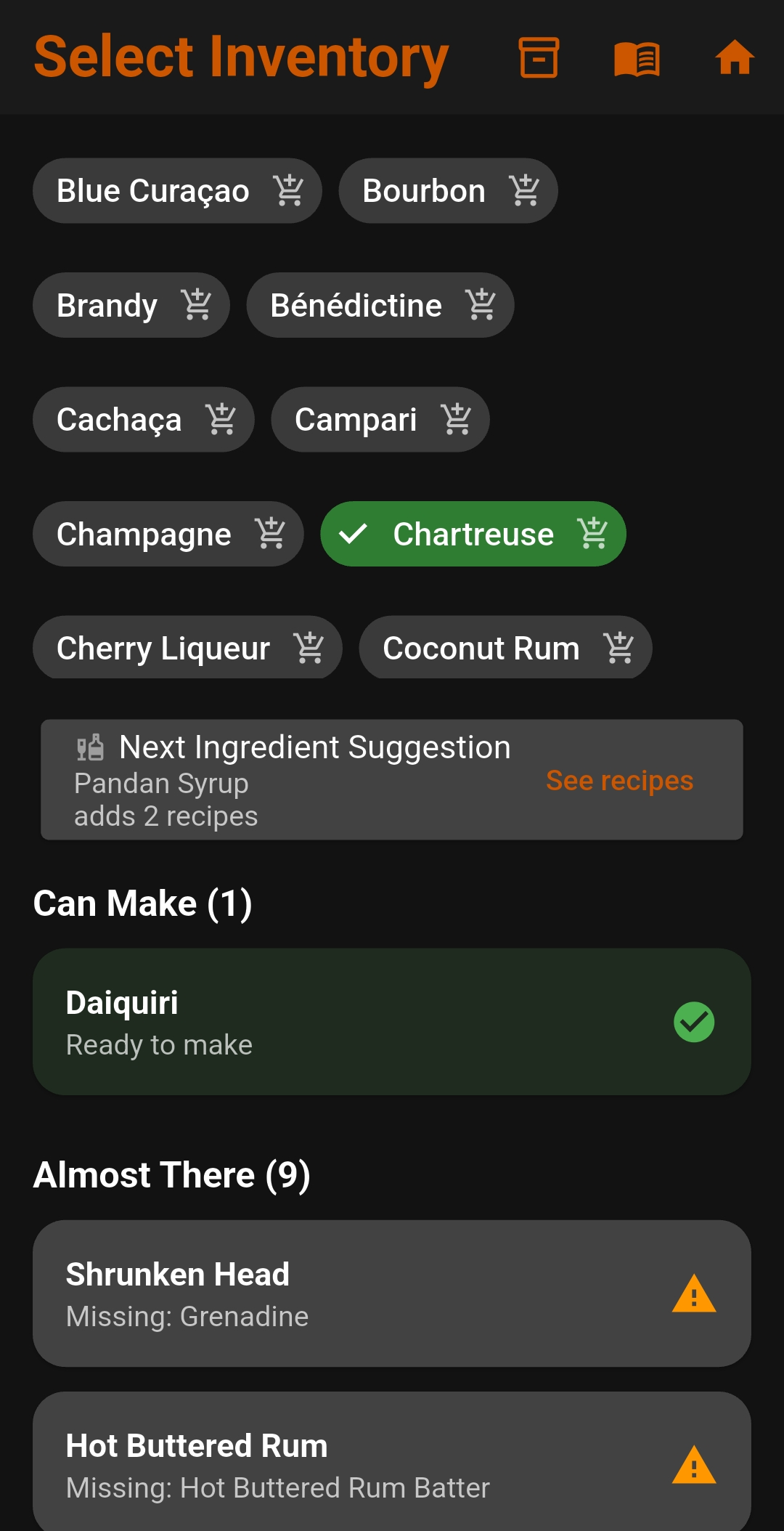
Open Select Inventory and tap each spirit, liqueur, mixer, syrup, and other ingredient you have. A green selection means it is included in your bar.
Can Make shows drinks that are ready now. Almost There shows recipes that need only a small number of additional ingredients.
Tap a cocktail to view its ingredients, measurements, preparation, glassware, ice, tools, and other useful reference details.
The suggestion card identifies an ingredient that unlocks more recipes. Select See recipes to preview what it adds.
Use the cart icon beside an ingredient to add or remove it from your Shopping List, then move purchased items into your inventory.
Use the library to browse drink recipes, ingredients, components, glassware, ice, and bar tools even when they are not part of your current inventory.
Questions and answers
CocktailScan is currently in a closed Android beta. Approved testers must use the direct Google Play links on the beta access page.
Request access with the Google account you use for Google Play. After that email is manually added to the tester list, use the direct opt-in link while signed into the same account.
Not yet. The current beta uses manual inventory selection so recipe matching remains accurate and easy to understand.
“Can Make” recipes have all required ingredients in your inventory. “Almost There” recipes identify what is still missing so you can decide what to buy next.
Your ingredient inventory and app preferences are stored locally on your device. CocktailScan does not require an account.
Visit Support to report a bug, submit a recipe, request an attribution correction, or contact CocktailScan.

About CocktailScan
CocktailScan began with a simple question: if an app could understand your bar, could it tell you what to make?
That idea grew into a broader home-bar toolkit—inventory, recipe matching, substitutions, component preparation, shopping guidance, reference material, and sharing—without losing sight of the original goal.
The result is designed to feel crafted rather than corporate: practical enough for a first drink, detailed enough to grow with an enthusiastic home bartender.
Android closed beta
CocktailScan is now available to approved Android closed-test participants. Request access with the Google account you use for Google Play.